Test First Workflow – A Short Story

As a depiction of the typical approach taken when solving a problem with Test First practices in mind, below is a brief excerpt from a recent conversation with a colleague who inquired as to how one generally goes about solving a problem using Test First methodologies. My explanation was rather simple, and read somewhat like a short story, though I describe it as being more of a step by step process from a Pair Programming perspective.

The general workflow conveyed in my description, while brief, covers the essentials:

  1. We have a problem to solve.
  2. We discuss the problem, asking questions as needed; then dig a bit deeper to ensure we understand what it is we are really trying to solve; and, most importantly, why.
  3. We consider potential solutions, identifying those most relevant, evaluating each against the problem; then agree upon one which best meets our needs.
  4. We define a placeholder test/spec where our solution will be exercised. It does nothing yet.
  5. We implement the solution in the simplest manner possible, directly within the test itself; the code is quite ugly, and that is perfectly fine, for now. We run our test, it fails
  6. We adjust our implementation, continuing to focus solely on solving the problem; all the while making sure not to become too distracted with implementation details at this point.
  7. We run our test again, it passes. We’re happy, we’ve solved the problem.
  8. We move our solution out of the test/spec to the actual method which is to be implemented, which, until now, had yet to exist.
  9. We update our test assertions/expectations against the actual (SUT). We run our test, it passes.
  10. We’re happy, we have a working, tested solution; however, the implementation is substandard; this has been nagging at us all along, so we shift focus to our design; refactoring our code to a more elegant, performant solution; one which we can be proud of.
  11. We run our test again, it fails. That’s fine, perhaps even preferable, as it verifies our test is doing exactly what is expected of it; thus, we can continue to refactor in confidence.
  12. We adjust our code, continuing to make design decisions and implementation changes as needed. We run our test again, it passes.
  13. We refactor some more, continuing to focus freely, and without worry on the soundness of our design and our implementation. We run our test again, it passes.

Rinse and Repeat…

While the above steps are representative of a typical development work-flow based on Test First processes, it is worth noting that as one becomes more acclimated with such processes, certain steps often become unnecessary. For example, I generally omit Step #5 insofar as implementing the solution within the test/spec itself is concerned; but rather, once I understand the problem to be solved, I then determine an appropriate name for the method which is to be tested, and implement the solution within the SUT itself, as opposed to the test/spec; effectively eliminating the need for Step #8. As such, the steps can be reduced down to only those which experience proves most appropriate.

Concluding Thoughts

Having become such an integral part of my everyday workflow for many years now, I find it rather challenging to approach solving a problem without using Test First methodologies. In fact, attempting to solve a problem of even moderate complexity without approaching it from a testing perspective feels quite awkward.

The simple fact is, without following general Test First practices, we are just writing implementation code, and if we are just writing implementation code, then, in turn, we are likely not thinking through a problem in it’s entirety. Consequently, it follows then that we are also not thinking through our solutions in their entirety, and hence our designs. Because of this, solutions feel uncertain, and ultimately leave us feeling much less confident in the code we deliver.

Conversely, when following sound testing practices we afford our team and ourselves an unrivaled sense of confidence in terms of the specific problems we are solving, why we are solving them, and how we go about solving them; from that, we achieve a concerted understanding of the problem domain, as well as a much clearer, holistic understanding of our designs.

Simplifying Designs with Parameter Objects

Recently, while reading the HTML5 Doctor interview with Ian Hickson, when asked what some of his regrets have been over the years, the one he mentions, rather comically so as being his “favorite mistake”, also happened to be the one which stood out to me most; that is, his disappointment with pushState; specifically, the fact that of the three arguments accepted, the second argument is now ignored.

I can empathize with his (Hixie’s) frustration here; not simply because he is one of the most influential figures on the web – particularly for his successful work surrounding CSS, HTML5, and his responsibilities at the WHATWG in general – but rather, it is quite understandable how such a seemingly insignificant design shortcoming would bother such an obviously talented individual, especially considering the fact that pushState's parameters simply could not be changed due to the feature being used prior to completion. Indeed, the Web Platform poses some very unique and challenging constraints under which one must design.

While the ignored pushState argument is a rather trivial issue, I found it to be of particular interest as I often employ Parameter Objects to avoid similar design issues.

Parameter Objects

The term “Parameter Object” is one I use rather loosely to describe any object that simply serves as a wrapper from which all arguments are provided to a function. In the context of JavaScript, object literals serve quite well in this capacity, even for simpler cases where a function would otherwise require only a few arguments of the same type.

Parameter Objects are quite similar to that of an “Options Argument” – a pattern commonly implemented by many JavaScript libraries to simplify providing optional arguments to a function; however, I tend to use the term Parameter Objects more broadly to describe a single object parameter from which all arguments are provided to a function, optional arguments included. The two terms are often used interchangeably to describe the same pattern. However, I specifically use the term Options Argument to describe a single object which is reserved exclusively for providing optional arguments only, and is always defined as the last parameter of a function, proceeding all required arguments.

Benefits

Parameter Objects can prove beneficial in that they afford developers the ability to defer having to make any final design decisions with regard to what particular inputs are accepted by a function; thus, allowing an API to evolve gracefully over time.

For instance, using a Parameter Object, one can circumvent the general approach of implementing functions which define a fixed, specific order of parameters. As a result, should it be determined that any one particular parameter is no longer needed, API designers need not be concerned with requiring calling code to be refactored in order to allow for the removal of the parameter. Likewise, should any additional parameters need to be added, they can simply be defined as additional properties of the Parameter Object, irrespective of any particular ordering of previous parameters defined by the function.

As an example, consider a theoretical rotation function which defines five parameters:

Using a Parameter Object, we can refactor the above function to the following:

Should we wish to remove a parameter from the function, doing so simply requires making the appropriate changes at the API level without changing the actual signature of the function (assuming of course, there are no specific expectations already being made by calling code regarding the argument to be removed). Likewise, should additional parameters need to be added, such as a completion callback, etc., doing so, again, only requires making the appropriate API changes, and would not impact current calling code.

Additionally, taking these potential changes as an example, we can also see that with Parameter Objects, implementation specifics can be delegated to the API itself, rather than client code insofar that the provided arguments can be used to determine the actual behavior of the function. In this respect, Parameter Objects can also double as an Options Argument. For example, should the arguments required to perform a 3D rotation be omitted from the Parameter Object, the function can default to a 2D rotation based on the provided arguments, etc.

Convenience

Parameter Objects are rather convenient in terms of there being less mental overhead required than that of a function which requires ordered arguments; this is especially true for cases where a function defines numerous parameters, or successive parameters of the same type.

Since code is generally read much more frequently than it is written, it can be easier to understand what is being passed to a function when reading explicit property names of an object, in which each property name maps to a parameter name, and each property value maps to parameter argument. This can aid in readability where it would otherwise require reading the rather ambiguous arguments passed to a function. For example:

With Parameter Objects it becomes more apparent as to which arguments correspond to each specific parameter:

As mentioned, if a function accepts multiple arguments of the same type, the likelihood that users of the API may accidentally pass them in an incorrect order increases. This can result in errors that are likely to fail silently, possibly leading to the application (or a portion thereof) becoming in an unpredictable state. With Parameter Objects, such unintentional errors are less likely to occur.

Considerations

While Parameter Objects allow for implementing flexible parameter definitions, the arguments for which being provided by a single object, they are obviously not intended as a replacement for normal function parameters in that should a function need only require a few arguments, and the function’s parameters are unlikely to change, then using a Parameter Object in place of normal function parameters is not recommended. Also, perhaps one could make the argument that creating an additional object to store parameter/argument mappings where normal arguments would suffice adds additional or unnecessary overhead; however, considering how marginal the additional footprint would be, this point is rather moot as the benefits outweigh the cost.

A Look at pushState’s Parameters

Consider the parameters defined by pushState:

  1. data: Object
  2. title: String
  3. url: String

The second parameter, title, is the parameter of interest here as it is no longer used. Thus, calling push state requires passing either null or an empty String (recommended) as the second argument (i.e. title) before one can pass the third argument, url. For example:

Using a Parameter Object, pushState could have been, theoretically, implemented such that only a single argument was required:

  1. params: Object
    • data: Object
    • title: String
    • url: String

Thus, the ignored title argument could be safely removed from current calling code:

And simply ignored in previously implemented calls:

As can be seen, the difference between the two is quite simple: the specification for pushState accepts three arguments, whereas the theoretical Parameter Object implementation accepts a single object as an argument, which in turn provides the original arguments.

Concluding Thoughts

I certainly do not assume to understand the details surrounding pushState in enough detail to assert that the use of a Parameters Object would have addressed the issue. Thus, while this article may reference pushState as a basic example to illustrate how the use of a Parameter Object may have proved beneficial, it is really intended to highlight the value of using Parameter Objects from a general design perspective, by describing common use-cases in which they can prove useful. As such, Parameter Objects provide a valuable pattern worth considering when a function requires flexibility.

Basic Dependency Injection with RequireJS

Recently, I was having a conversation about the basic concepts of IoC/DI, and, specifically, how they pertain to modern (single page) JavaScript Web Applications. This discussion was quite interesting, and so I felt inclined to share some thoughts on the subject with a wider audience.

Dependency Injection in JavaScript

Being a dynamic language, when designing JavaScript based architectures, in comparison to architectures which are under the constraints of a statically typed language, one is typically less inclined to consider the relevance of, or immediate need for, a complete IoC container. Of course, context is key, and so there are certainly JavaScript applications which can benefit from an IoC container (such as wire.js). As such, it would not be prudent for one to suggest otherwise; but rather, this is simply to say that for the majority of JavaScript applications, standard AMD loaders provide a sufficient means of managing dependencies; as the rigidness inherent to statically typed languages which IoC containers help manage are generally less relevant to dynamic languages.

With that being said, while a robust IoC container may not be necessary for the majority of JavaScript applications, it is quite important to emphasize the benefits of employing basic dependency management and Dependency Injection; as this is an essential design characteristic which is critical to the success and overall maintainability of large scale client-side web applications.

Facilitating Code Reuse

Anyone who has been responsible for developing and maintaining specific core features across multiple applications is likely to understand that the ability to facilitate reuse of JavaScript modules is crucial. This is particularly important in the context of architectures which must account for the ability to support mulitple implementations of the same application across different form-factors; for, the ability to manage and configure dependencies can prove paramount; allowing for a framework upon which various form-factor specific implementations of an application can be supported.

In addition to this, as one might expect, having the flexibility necessary for configuring dependencies lends itself, quite naturally so, to various unit testing scenarios.

Configuring Dependencies with RequireJS

Though not always immediately apparent, applications leveraging RequireJS are essentially using a basic form of Dependency Injection out of the box – even if not in the most purist sense of the term. However, the simple matter of mapping module names to module implementations can be considered, in-of-itself, a basic form of Dependency Injection, or perhaps, one could argue this as being more of a Service Locator, as RequireJS does not instantiate dependencies on a clients behalf. Regardless of the preferred classification, this mechanism of defining dependencies is quite important, as it affords developers the ability to change module implementations as desired without the need to change client code. Of course, such modules must adhere to a specific contract (interface) so as to ensure clients which depend on specific named modules receive the expected API.

Explicit Dependencies

Consider a rather contrived example of a shared Application module which is used across two separate applications; one for Mobile and one for Desktop; with the Application module having a dependency on an AppHelper module:

Both the Mobile and Desktop applications can easily map the AppHelper module to a context specific implementation via their respective main.js configurations:

Based on the above, it is rather evident that the AppHelper module is mapped to the appropriate application specific implementation; MobileHelper for mobile, and DesktopHelper for desktop. Additional context specific APIs can just as easily be defined, and thus provided as dependencies to other modules as needed using this very simple pattern.

Implicit Dependencies

Dependencies need not always be explicit, but rather they can also be implicitly mapped based on the path to which each application’s main.js configuration resides, or based on the configured baseUrl path.

For instance, given the above example, we can map a Templates Module, and implicitly inject the path to each context specific template based on the application’s default path, or baseUrl path:

As can be seen, each application’s main.js defines a Templates module and a TemplateSource module, respectively, with each being shared amongst both the Mobile and Desktop specific applications. The Templates and TemplateSource modules are defined as follows:

While both the Mobile and Desktop applications may share the same Templates and TemplateSource modules, the specific implementation of the templates loaded from TemplateSource is determined via each application’s base path; thus, the path to app/templates/some-view.tpl automatically resolves to the context specific template; i.e.: mobile/app/templates/some-view.tpl for Mobile, and desktop/app/templates/some-view.tpl for Desktop.

Concluding Thoughts

While the above examples are rather basic, they do serve well to demonstrate just how easily one can design for module reuse across different applications with RequireJS, which itself allows for much more robust configurations of modules; such as loading context specific modules at runtime, augmenting modules for differing contexts with mixins, providing third-party libraries based on a particular form-factor (e.g. jQuery for Desktop, Zepto for Mobile, etc.), and more.

You can clone the above example here.

Quick Tip: Chrome Developer Tools Shortcut Keys

Sometimes it is the more subtle, less obvious features provided by tools which prove to be surprisingly useful. Interestingly, while such features can save developers considerable time and effort, they are often much less apparent, and thus, occasionally overlooked when compared to their main counterparts.

A noteworthy example of some very simple, yet extremely useful features can be found in just a few of the basic Chrome Developer Tools shortcut keys. Below is a brief description of the most convenient shortcuts I find myself using regularly.

Go to Source (Cmd-O)

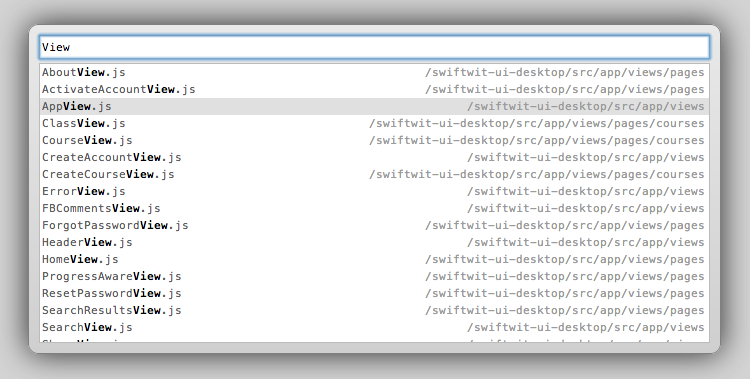
Perhaps the most useful short-cut available in the sources panel, Cmd-O allows one to quickly search for a specific source file (thanks to @augiemarcello for this one):
Chrome Developer Tools Command-O

Show Functions (Cmd-shift-O)

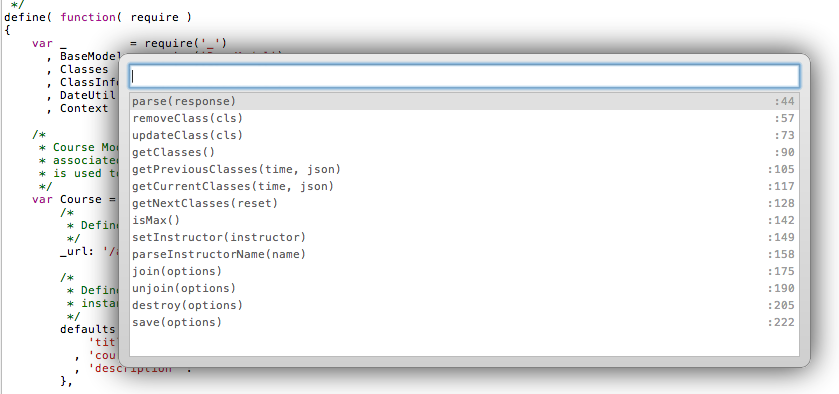
Another extremely useful feature in the Sources Panel, Cmd-shift-O displays a list of all functions and their corresponding line numbers within the current source file:
Chrome Developer Tools Command-Shift-O

Clear Console (Cmd-K/)

Clears the console when in focus:
Chrome Developer Tools Command-k

Previous/Next Panel (Cmd-[ / Cmd-])

Toggles between Developer Tools Panels (e.g. Elements, Resources, Network, Sources etc.):
Chrome Developer Tools Command-[]

There are quite a few additional shortcut keys available in Chrome Developer Tools, and Jared has done a excellent job of providing a Devtools cheat sheet. I highly recommend trying some of them out; committing to memory those which you find most useful – and sharing them with others as well.

HTML5 Document Outliner

Recently, while preparing a training session on HTML5 Semantic and Structural Elements, I was rather intent on conveying the importance of an application’s overall markup and structure, while also expressing the importance of not being overly concerned with the absolute technical “correctness” of each and every element used.

With this in mind, providing a general overview of HTML5 sectioning content, and HTML5 Document Outlines, seemed appropriate points to emphasize.

Before doing so, I was looking to utilize a simple utility to provide a means of visualizing an HTML5 Document Outline, and the very useful Chrome Extension, HTML5 Outliner, proved to be an ideal tool for the task.

In particular, the HTML5 Outliner is quite helpful in validating the overall structure of single page web applications, whereby the constructed page is based on multiple disparate client-side templates being rendered at runtime; in which case it can be rather useful to have a holistic view of an application’s structure.

And so, if you are building modern client-side web applications, and using Chrome, if you haven’t done so already, I certainly recommend installing the HTML5 Document Outline for quickly viewing an application’s overall structure.

Github Source Anchors

Recently while viewing the documentation and source for Lo-Dash, I noticed an interesting Github feature which allows for linking to any line number within a source file, and highlighting the line when the page is loaded, via URL anchors.

Linking to line numbers in source files

To link to a specific line of code in a source file on Github, simply click on the line number, which updates the URL with an anchor to that particular line number, or manually append an anchor to the URL in the form #L<line-number>.

For example, here is a link to the EventRegistry in the Backbone.EventBroker.

Linking to blocks in source files

After discovering this interesting little feature, I tried out a few other things and found that a block of code can also be anchored to as well, allowing for the block to become highlighted when the page is loaded.

Creating an anchor to a code block is as simple as selecting a line and pressing CTRL+SHIFT while selecting another line. Alternately, the line numbers can be manually added in the hash by specifying start and end line numbers in the form #L<line-number-start>-<line-number-end>. For example, here is a link to the EventBroker.get method.

Considerations

Since source files are likely to change with each commit, it is important to be mindful of the potential side effect of linking to specific line numbers. This is necessary for the obvious reason that changes in source could result in links to line numbers which no longer correspond to the expected code.

That being said, the ability to link to a certain line in a source file is still a rather cool and useful feature, even if only used for sharing links quickly, or for linking to specific commits which are unlikely to change.